HomeProductsFuture School

PRODUCT // AI EDUCATION

Future School

Live mentors. Ten seats. A portfolio, not a certificate.

Future School teaches teenagers to work with AI the way engineers do: from prompting, through RAG and agents, to a project of their own on GitHub. Three tracks tuned to age and ambition, 20 live lessons with a mentor, code review and a Discord community. Every cohort is capped at ten students — enforced in the database, not in the copy on the page.

  • Ages 13–18
  • 20 live lessons
  • 10 students per cohort
  • Portfolio project on GitHub
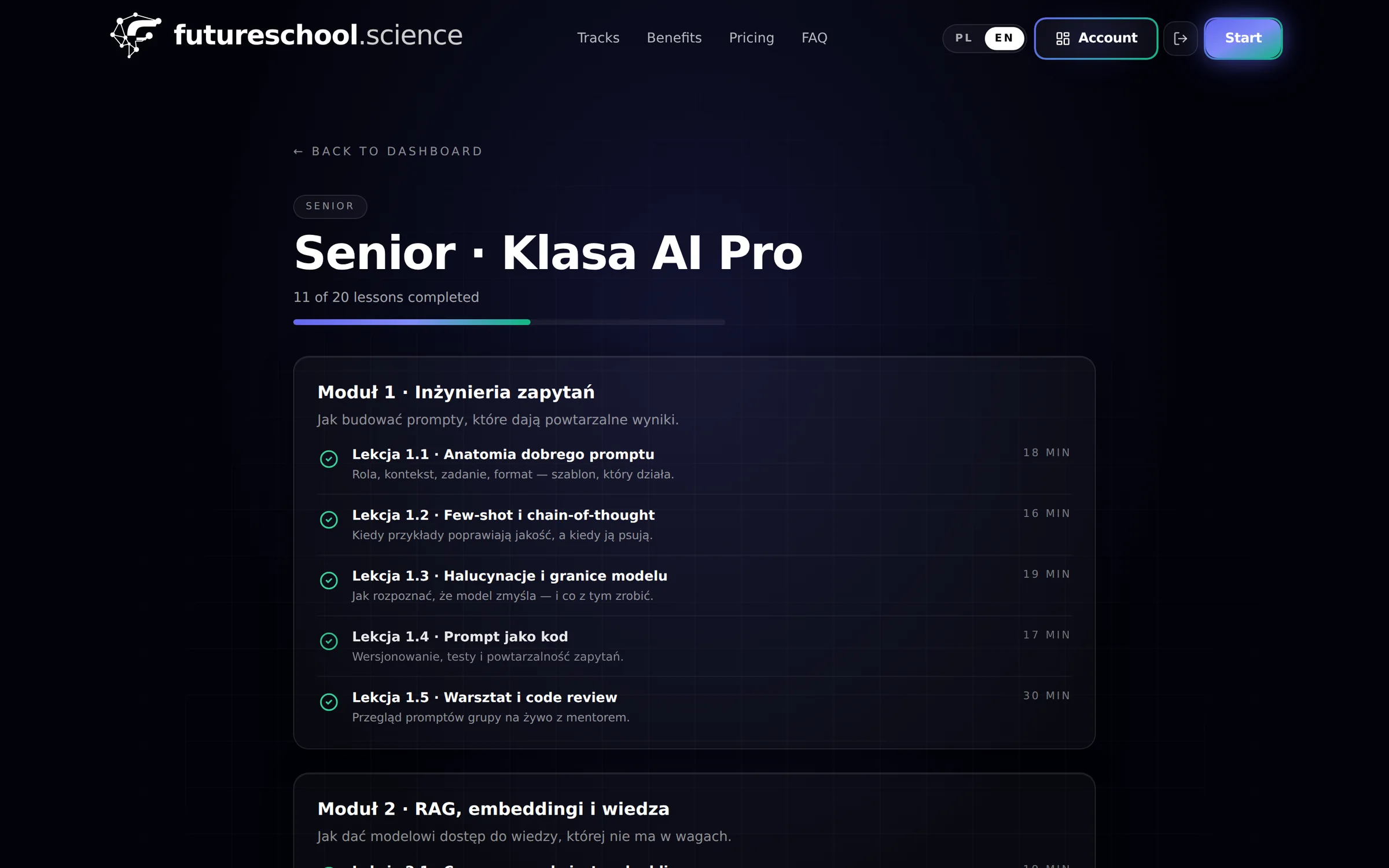
The Senior · AI Class Pro course outline in Future School — an “11 of 20 lessons completed” progress bar above modules with ticked-off lessons and durations

Why Future School

Teenagers already use AI. The only question is whether they understand what they are doing

Banning it does not work, and a recorded “prompting course” ends up in a tab nobody returns to. We built the thing in between: a small group, a live mentor, and a project you can actually show.

Ten students per cohort — and it stays ten

The cap is hard: enrolment reserves a seat inside a transaction holding an advisory lock, so two simultaneous sign-ups can never produce an eleventh student. That is a property of the system, not a marketing promise — which is why the mentor genuinely knows every student by name.
A project, not a certificate

The Senior track ends with a working project in a GitHub repository, taken through real code review. There is a certificate too — but the repository is what they show for a university application or a first internship.

We teach them to check, not to trust

Hallucinations, model limits, data privacy and the ethics of an answer are their own lessons, not a paragraph in the terms of use. A student who knows when a model is making things up is safer than a student who was forbidden from using one.

The parent owns the account, the child takes the course

A parent enrols and controls access, payment and data. Data export and deletion are buttons in the panel, not an email to an administrator. Fourteen days to cancel with a full refund — no questions asked.

Capabilities

Three tracks, one platform

Junior builds the fundamentals through projects, Senior moves into engineering, and the bootcamp is a weekend dose for the time-poor. Plus 1:1 mentoring for one specific problem.

01

Junior · ages 13–14

Fundamentals through games, projects and creative experiments — no theory for theory’s sake. What a language model is, how to talk to one, why it sometimes makes things up, and what it knows about you. Ends with their own mini-assistant. 20 live lessons over 10 weeks, 1 499 zł.

02

Senior · ages 15–18

Prompt engineering, working with Claude, Gemini and Cursor, RAG and embeddings, agents and the MCP protocol, cost control. 1:1 mentoring, code review and a portfolio project on GitHub. Ends with a certificate and a reference letter. 20 live lessons over 10 weeks, 2 199 zł.

03

Ultra Fast Prompting Bootcamp

Three 60-minute sessions across one weekend, for the busiest — ages 14+ and adults. Ready-made prompt templates, personalisation to your own way of working, live Q&A and recordings. 499 zł.

04

AI mentoring 1:1

An hour with a mentor on one specific problem, scheduled individually. You leave with a 30-day action plan, a recording of the session and a follow-up a week later. No long-term commitment. 500 zł.

05

Live lessons plus recordings

Classes run live twice a week at 18:00, and the recording stays available indefinitely — behind a signed URL, so the link does not travel. Progress is stored server-side, so a student resumes at the same second on any device.

06

A Discord community per cohort

The invitation is single-use and expires after seven days, and the course role and cohort channel are granted automatically once enrolment is confirmed. Students talk to their own cohort, not to an anonymous thousand-member server.

07

An admin console for the organiser

Participants, cohorts, seat occupancy, email campaigns, promo codes and a built-in blog. Admin access is protected by MFA, and every event lands in a log that cannot be edited — not even by an administrator.

08

GDPR compliance from the parent’s side

Exporting your data and requesting its deletion are buttons in the parent panel, handled automatically. The interface ships in Polish and English, and transactional email has delivery and bounce logging.

Screenshots

Look inside

Captures of the running platform, not mockups — the course outline with a real student’s progress, the track line-up, and the parent dashboard.

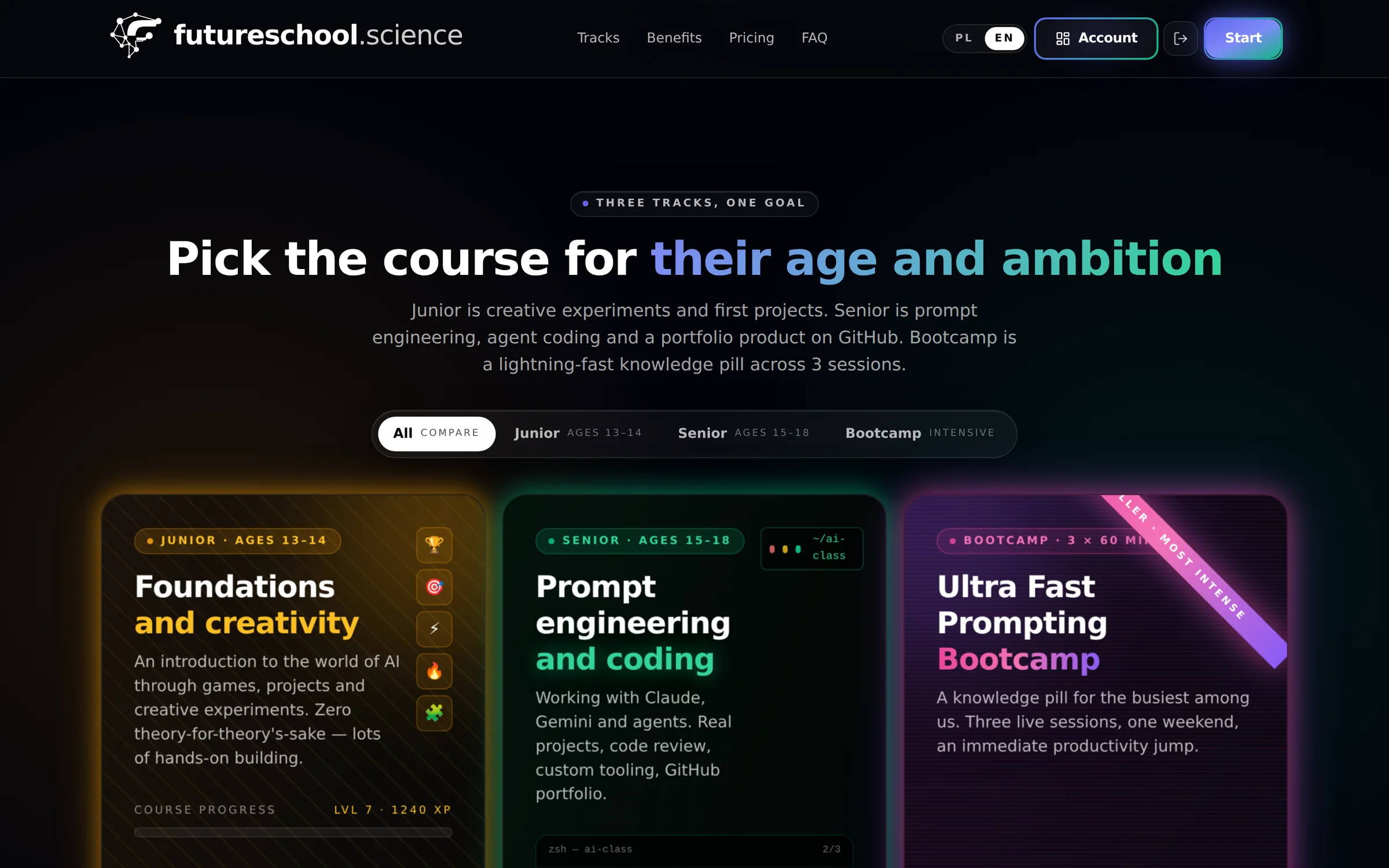
Future School — Three tracks

Three tracks

Junior, Senior and the weekend bootcamp side by side — with the age range each is built for, what it covers, and what it ends with.

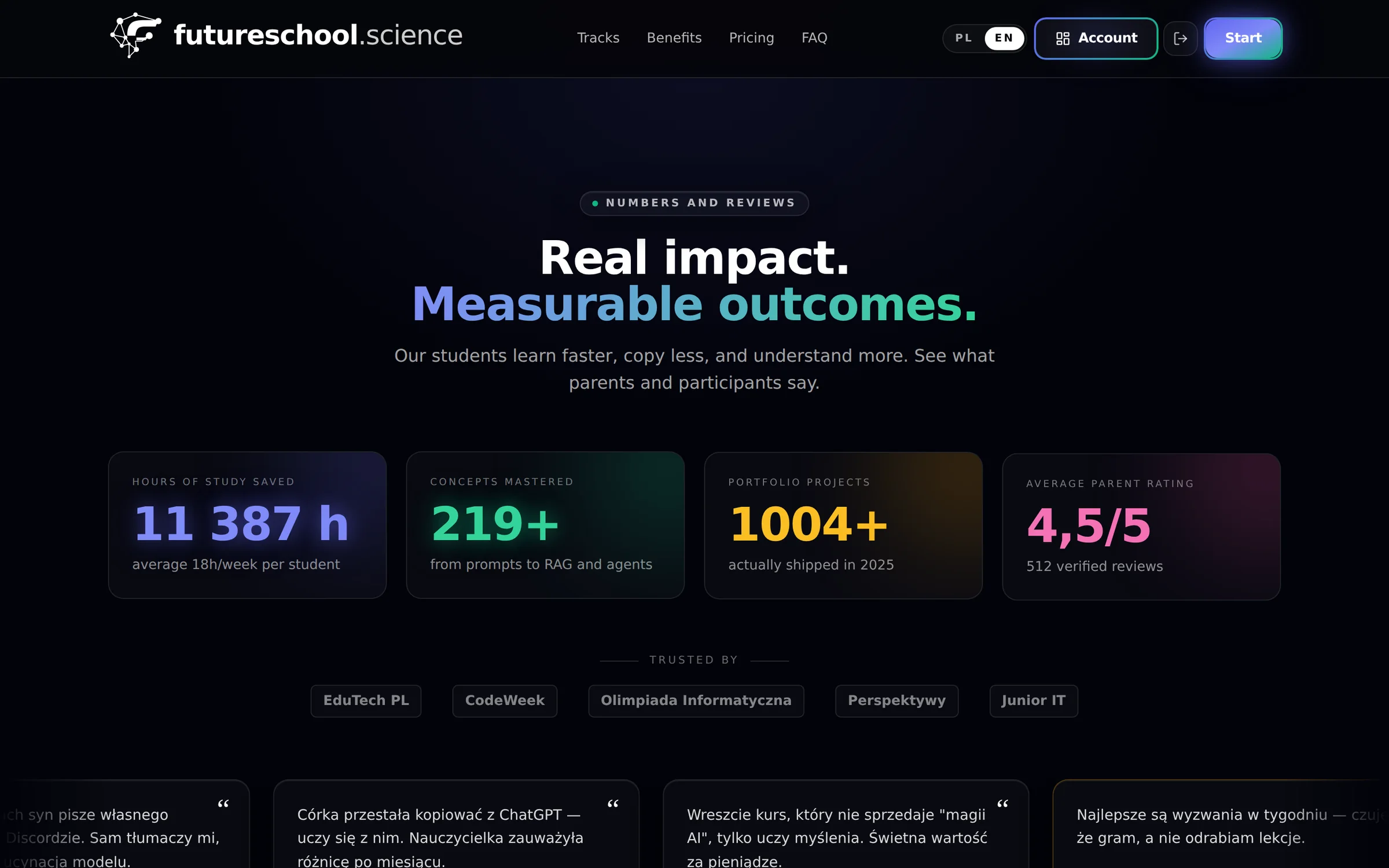
Future School — Outcomes and reviews

Outcomes and reviews

Study hours, concepts mastered, projects students actually shipped and parent ratings — alongside what parents and participants say.

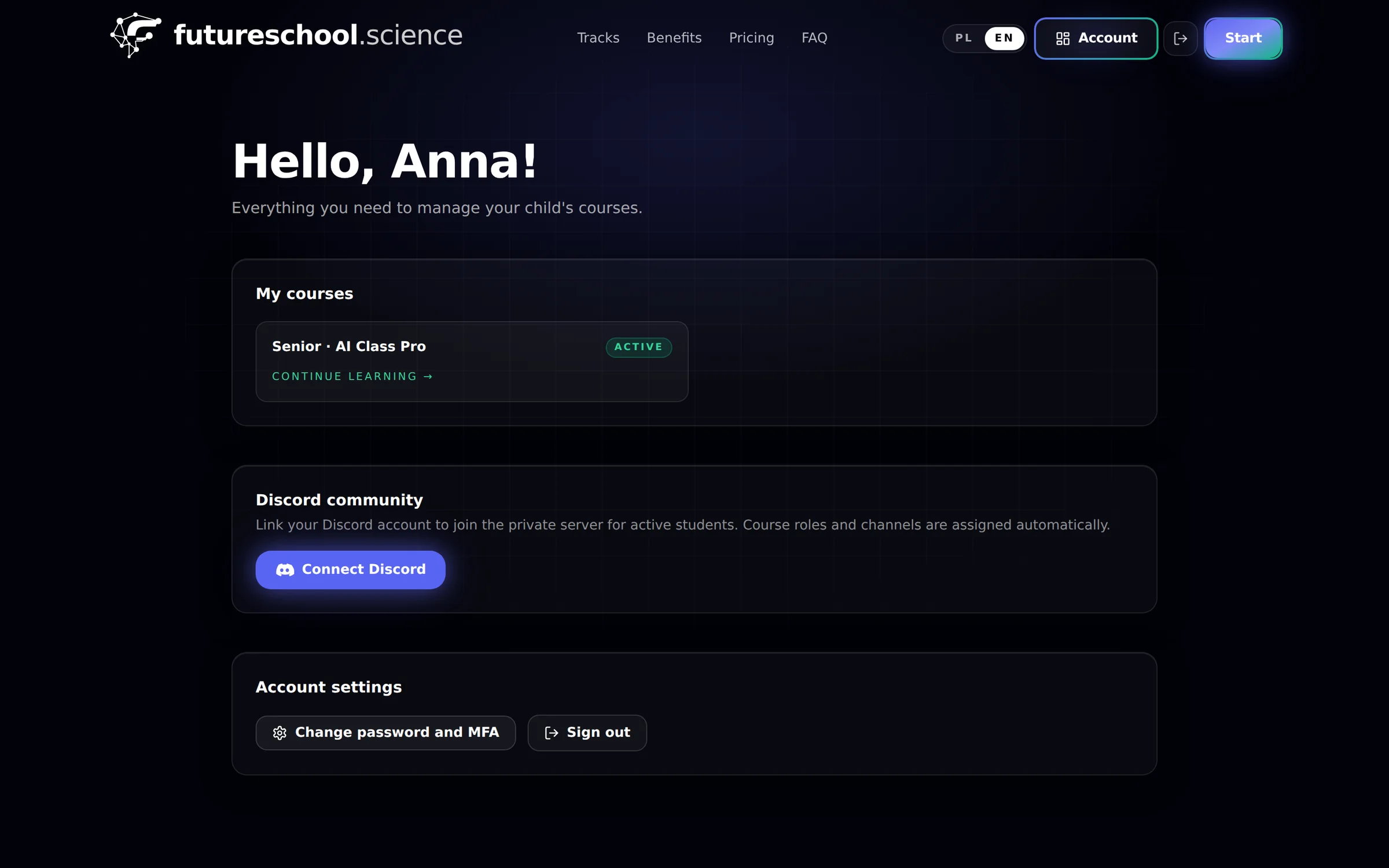
Future School — Parent dashboard

Parent dashboard

The parent account: their child’s active courses, access to the private Discord server, and account settings. The parent controls access and data.

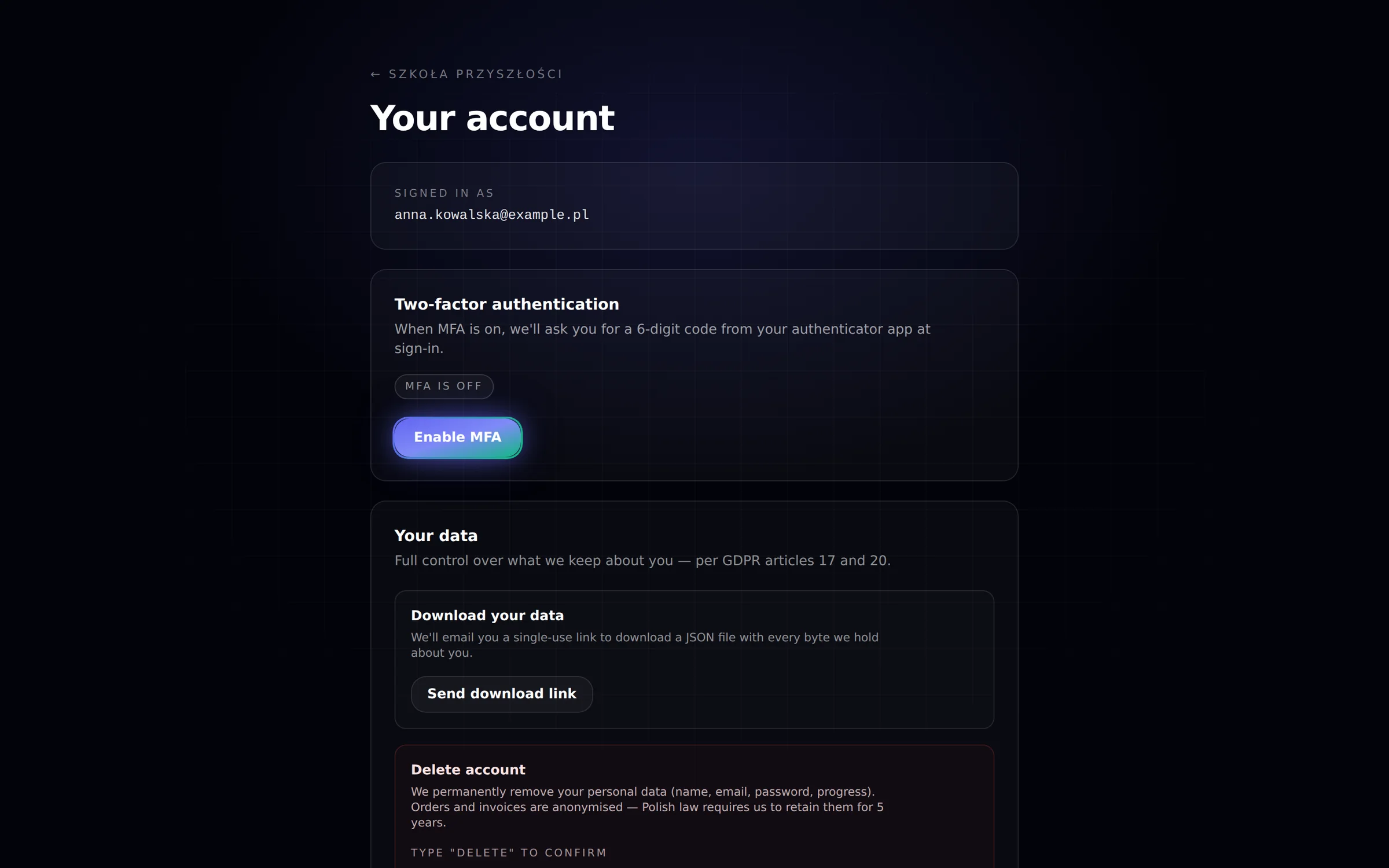
Future School — Account and personal data

Account and personal data

Two-factor authentication plus data export and deletion under GDPR articles 17 and 20 — a button in the panel, not an email to an administrator.

How it works

From sign-up to the first project

01

Pick a track and a cohort

Junior, Senior or the weekend bootcamp — plus a cohort, meaning a specific group with a start date and a class time. Every cohort shows how many seats are left; a full one closes sign-ups automatically.

02

Enrol in one form

The parent creates an account and reserves the seat in a single step; payment details follow once the seat is confirmed. A welcome email, a single-use Discord invitation and the class schedule arrive straight after.

03

Learn, build, show it

Two live lessons a week for ten weeks, recordings with no expiry, weekly challenges and a mentor on Discord. The Senior track ends with a project in a repository, taken through code review.

Pricing

A clear price. No catches.

One payment for the whole course, no subscription and no surcharge for materials. Enrol online; payment details follow once the seat is confirmed.

Ages 14+ / adults

Bootcamp

499 złone-off

  • 3 live sessions across one weekend
  • Ready-made prompt templates
  • Personalised to your own workflow
  • Notion templates and recordings
  • Certificate of completion
Take the Bootcamp

Ages 13–14

Junior

1 499 złone-off

  • 20 live lessons over 10 weeks
  • Mentor and Discord community
  • Weekly challenges and badges
  • First project: a mini-assistant
  • Ethics, safety, hallucinations
Choose Junior

Most popular

Senior

2 199 złone-off

  • 20 live lessons over 10 weeks
  • 1:1 mentoring and code review
  • Claude, Gemini, Cursor, RAG, agents, MCP
  • Portfolio project on GitHub
  • Certificate and reference letter
Choose Senior

Ages 16+ / adults

Mentoring 1:1

500 złper 60 min

  • 60 minutes on one specific problem
  • A 30-day action plan
  • Session recording and materials
  • Email follow-up after 7 days
  • Scheduled individually
Book a session

Prices in PLN, per student, for the whole course. Every cohort has a hard cap of 10 students, enforced server-side. Fourteen days to cancel with a full refund. 1:1 mentoring is billed per session and scheduled individually.

Specs

Programme details

Age
Junior 13–14 · Senior 15–18 · Bootcamp 14+ and adults · Mentoring 16+ and adults
Format
Live lessons twice a week at 18:00 (Junior and Senior) · bootcamp across one weekend
Length
20 live lessons over 10 weeks · bootcamp 3 × 60 min · mentoring 60 min
Cohort
A hard cap of 10 students per cohort, enforced server-side
Dates
Three cohorts: October 2026 · January 2027 · February 2027
Tools
Claude · Gemini · Cursor · GitHub · Discord · RAG, embeddings, agents, MCP
Outcome
Certificate of completion · portfolio project in a repository (Senior) · reference letter (Senior)
Platform
Web app · recordings behind signed URLs · progress stored server-side
Languages
Polish and English
Refunds
14 days to cancel with a full refund · data export and deletion in the parent panel

FAQ

What parents ask

Junior or Senior — how do we choose?

Junior is ages 13–14: fundamentals through creative projects and gamification, with no programming experience required. Senior is ages 15–18: prompt engineering, coding with assistants and a portfolio project, so basic familiarity with any programming language helps. If you are unsure, write to us — we will help pick the track.

Is it really only ten students per cohort?

Yes, and it cannot be worked around. Enrolment reserves the seat inside a transaction holding a database advisory lock, so two simultaneous sign-ups for the last seat will never create an eleventh student — one succeeds, the other is told the cohort is full. When a cohort fills, sign-ups close automatically.

What will my child have at the end?

Junior: a certificate, badges and their own mini-assistant. Senior: a certificate, a reference letter and — above all — a public repository holding a project that went through real code review, which is the thing you actually show. Recordings of every lesson stay available indefinitely.

Do they need a powerful computer or paid AI accounts?

No. A computer with a browser and a stable connection is enough. We work within the free tiers of the tools we use, and where an API key is needed we teach cost control first — one Senior lesson is precisely about not running up a 300 zł bill in one afternoon.

Who teaches the classes?

Practising engineers who build products on language models daily — the same people who wrote the other products in this catalogue. One mentor takes a cohort through the whole course, answers on Discord within 24 hours on business days, and does code review personally.

What if the course is not a fit?

Fourteen days to cancel with a full refund, no questions asked. The parent account also has data export and deletion buttons — handled automatically, without writing to an administrator.

Get in touch

A cohort for a school or a company, or a question about which track?

You can enrol yourself at futureschool.science — or write to us if you need a closed cohort for a class or a team, custom scheduling, or help choosing the right track for your child.

GDPR compliant. Your message goes straight to our inbox — no CRM, no marketing automation, no data resale.

Prefer email?hello@pixelofsoftware.com

See the live platform at futureschool.science