Your data never leaves the building
Documents, vector index, telemetry — everything lives in databases embedded inside the app on your Mac. No cloud APIs, no data-processing agreements, no vendor to audit. GDPR becomes a footnote, not a project.
PRODUCT // LOCAL AI HUB
Your company's private AI. One Mac. Zero cloud.
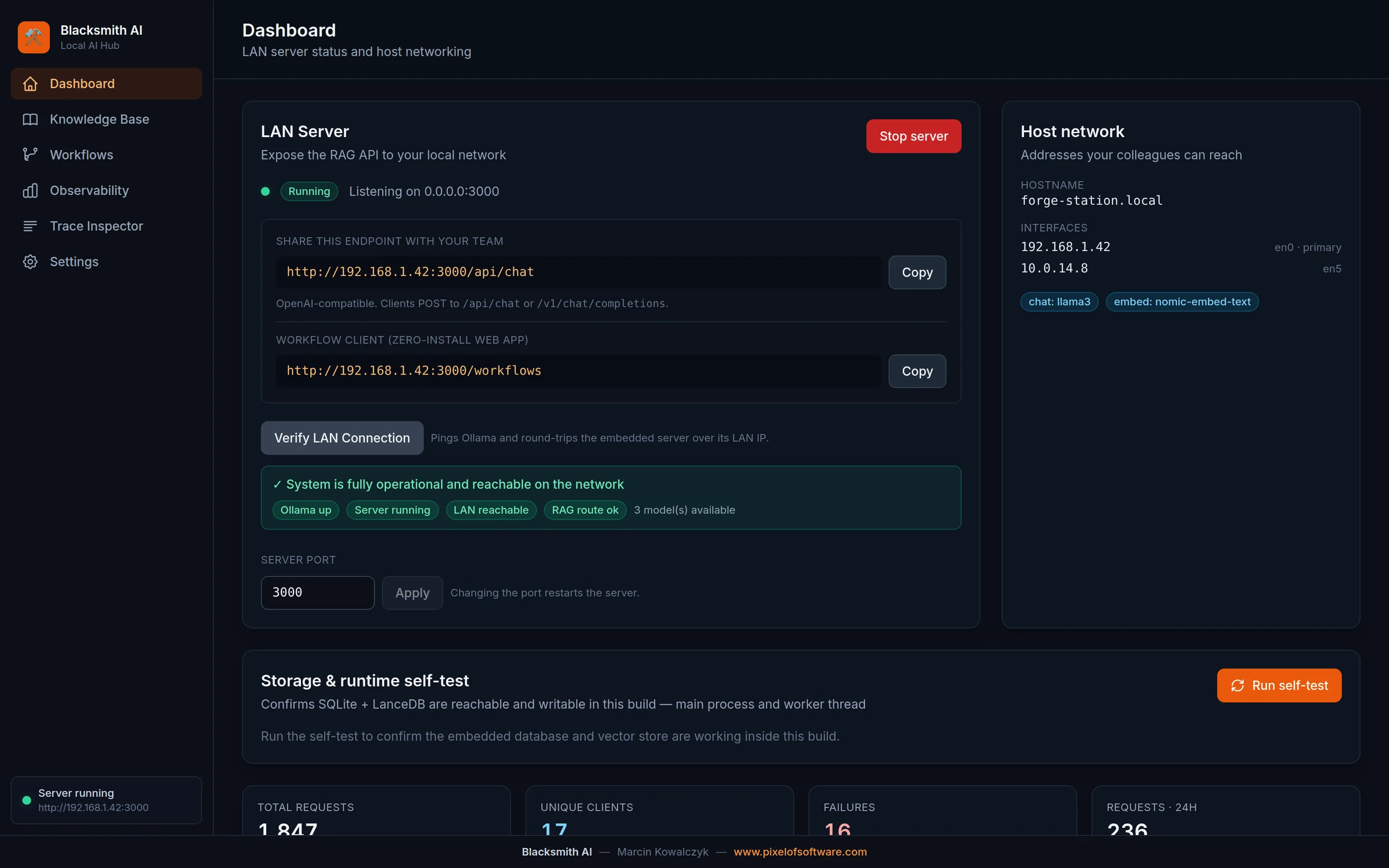
Blacksmith AI turns a single Apple Silicon Mac into a private AI hub for your whole team: it answers questions from your internal documents, automates real work with AI agents — and never sends a single byte outside your network. No cloud, no subscriptions, no per-token bills.
Why Blacksmith AI
Cloud AI is a fast way to ship your confidential documents to somebody else's computer. Blacksmith AI gives your team the same capability — grounded in your own knowledge — without the data ever leaving the office.
Documents, vector index, telemetry — everything lives in databases embedded inside the app on your Mac. No cloud APIs, no data-processing agreements, no vendor to audit. GDPR becomes a footnote, not a project.
Install one app on one Apple Silicon Mac and share a link. Around 20 colleagues use it simultaneously from their browsers — nothing to install on their machines, nothing to maintain in a server rack.
Local models via Ollama mean the marginal cost of a question is zero. No monthly seats, no usage anxiety, no invoice that grows with adoption — the economics stay flat while usage grows.
Each request is traced end-to-end: who asked, what was retrieved, which sources grounded the answer, how long it took. When someone asks "where did the AI get that?", you show them — down to the paragraph.
Capabilities
Blacksmith AI starts as a private knowledge assistant and scales into a visual automation platform — without ever changing its security model.
01
Drop in PDF, Word, Excel or JSONL files. Blacksmith AI parses, chunks and vectorises them locally, then answers questions with sources cited — instead of hallucinating.
02
Colleagues open a link in their browser and chat. Developers point any OpenAI SDK at the built-in OpenAI-compatible API. No accounts, no rollout project.
03
Design agentic pipelines on a drag-and-drop canvas: knowledge retrieval, AI personas, scripts and data sources wired into graphs — then publish them to the team with one click.
04
Chain agents into Writer → Critic → Editor refinement pipelines or bounded self-correcting loops, so output quality compounds instead of depending on one lucky prompt.
05
Function-calling tools let agents search the knowledge base, query data, send emails, generate Excel reports and produce formal documents — all recorded as auditable artifacts.
06
Agents can read procedures from Confluence, file and update Jira tickets, and pull external data through Model Context Protocol servers. Tokens live encrypted in the macOS keychain.
07
Traffic, latency, time-to-first-token and per-client token analytics — plus a trace inspector that shows every retrieval behind every answer. No external monitoring stack.
08
Model manager with hardware pre-flight checks, one-click backup and restore, instant abort, database wipe and a storage self-test. Built to be run by one person.
Screenshots
Real product, real UI — the operator console your admin sees and the analytics behind every answer.
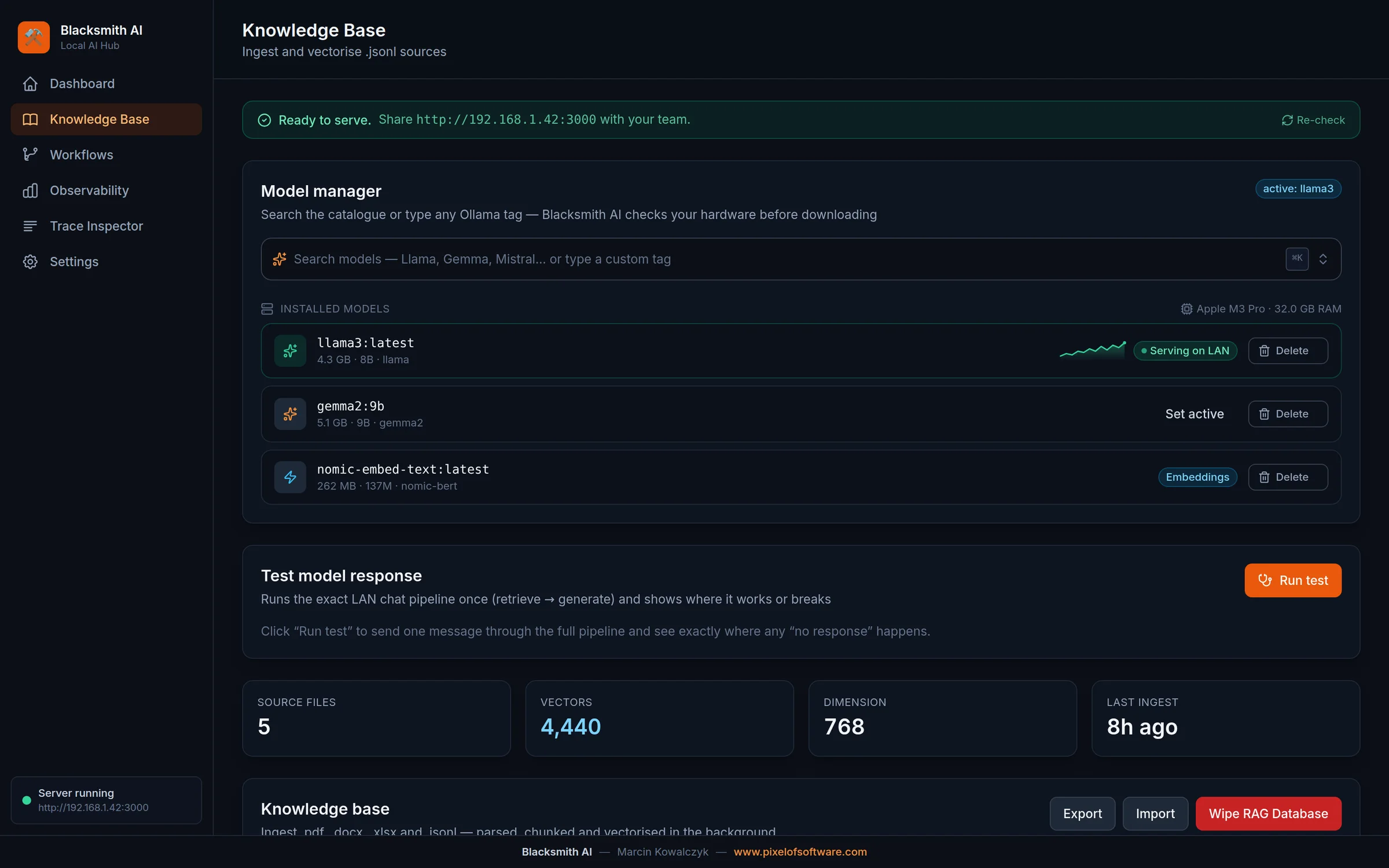
Knowledge Base
Model manager, universal document ingestion and hard controls — the whole RAG operation on one screen.
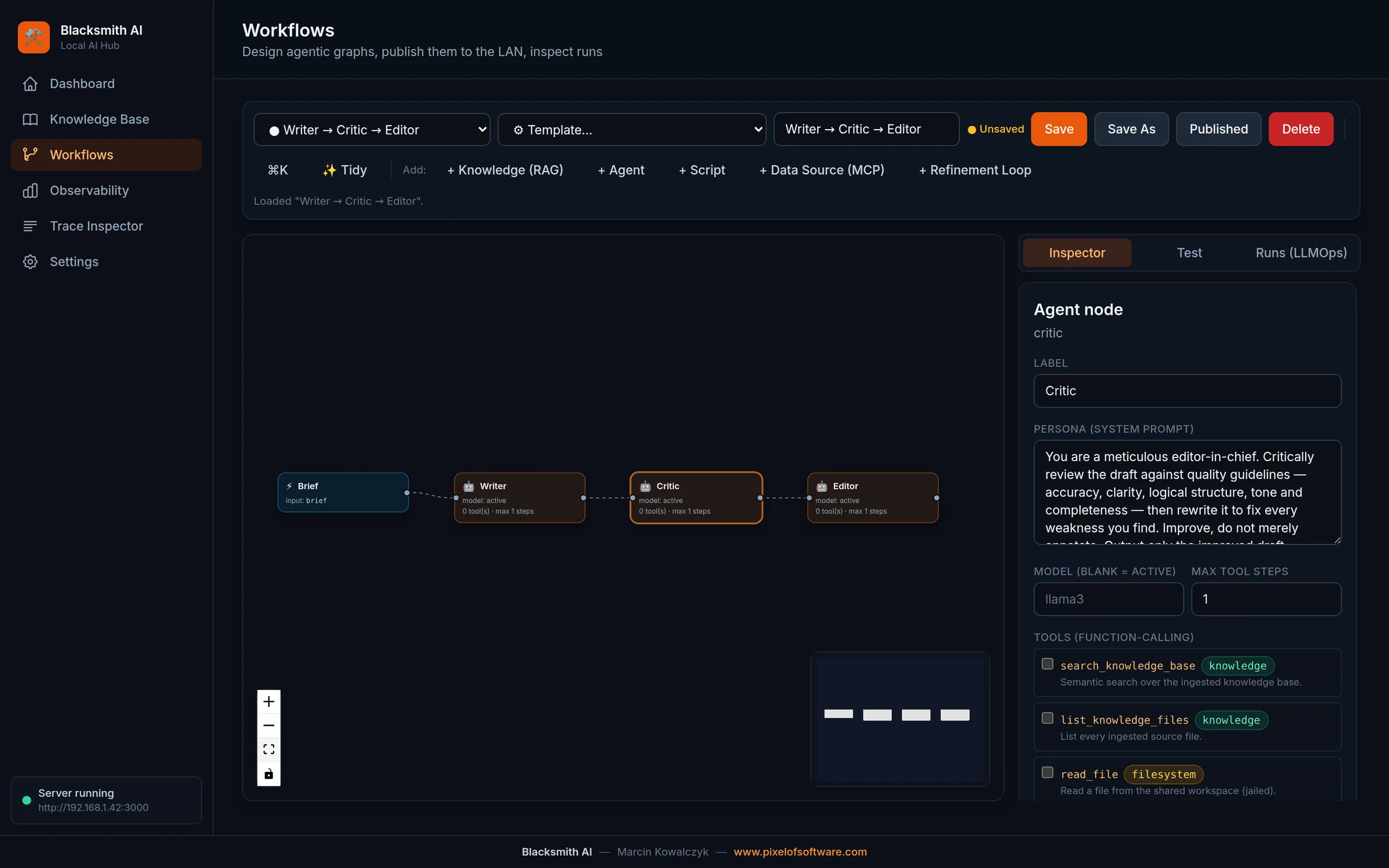
Workflow designer
A Writer → Critic → Editor pipeline on the visual canvas, with per-node personas and granted tools.
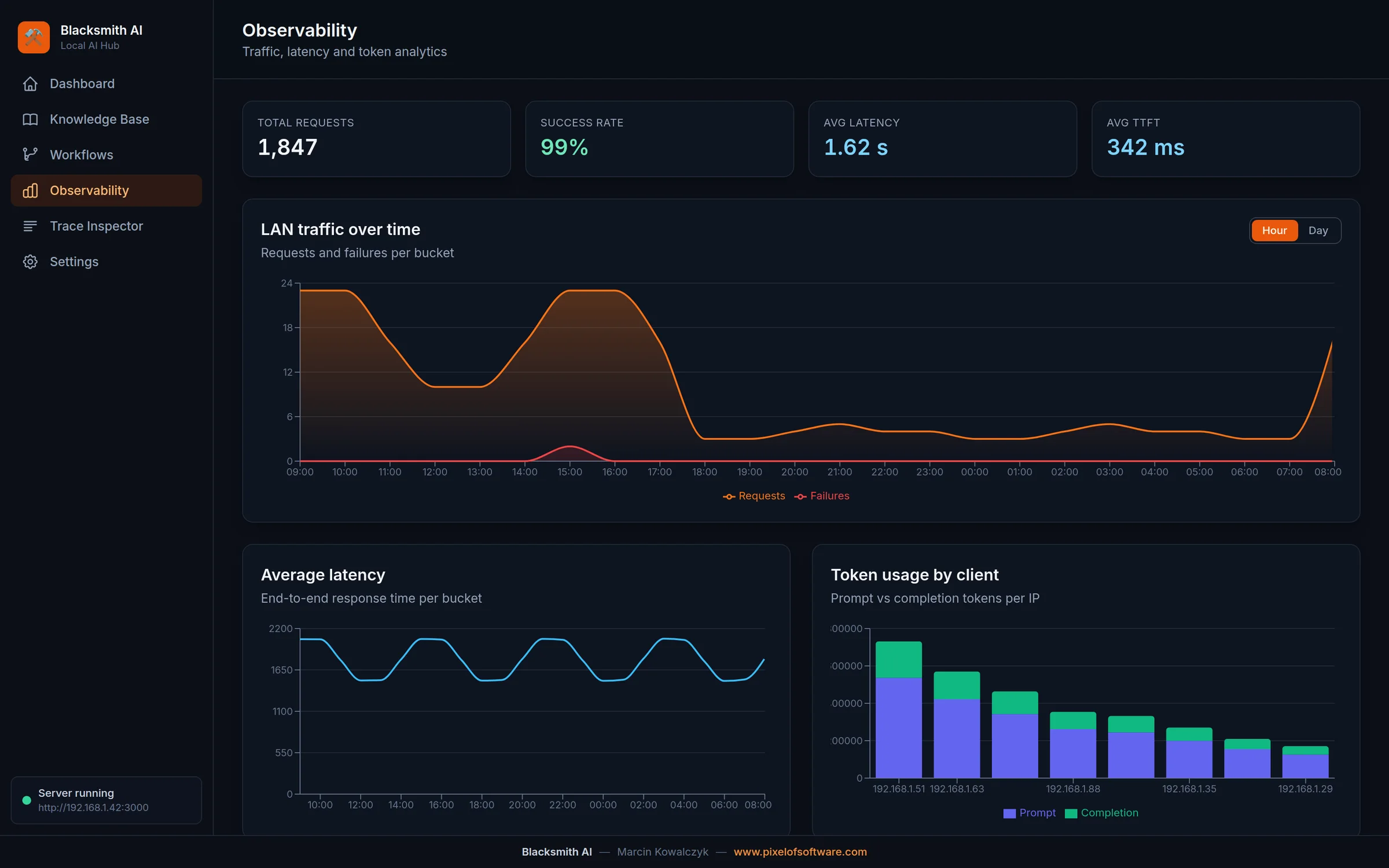
Observability
LAN traffic, latency and token usage per client — live, embedded, no external tooling.
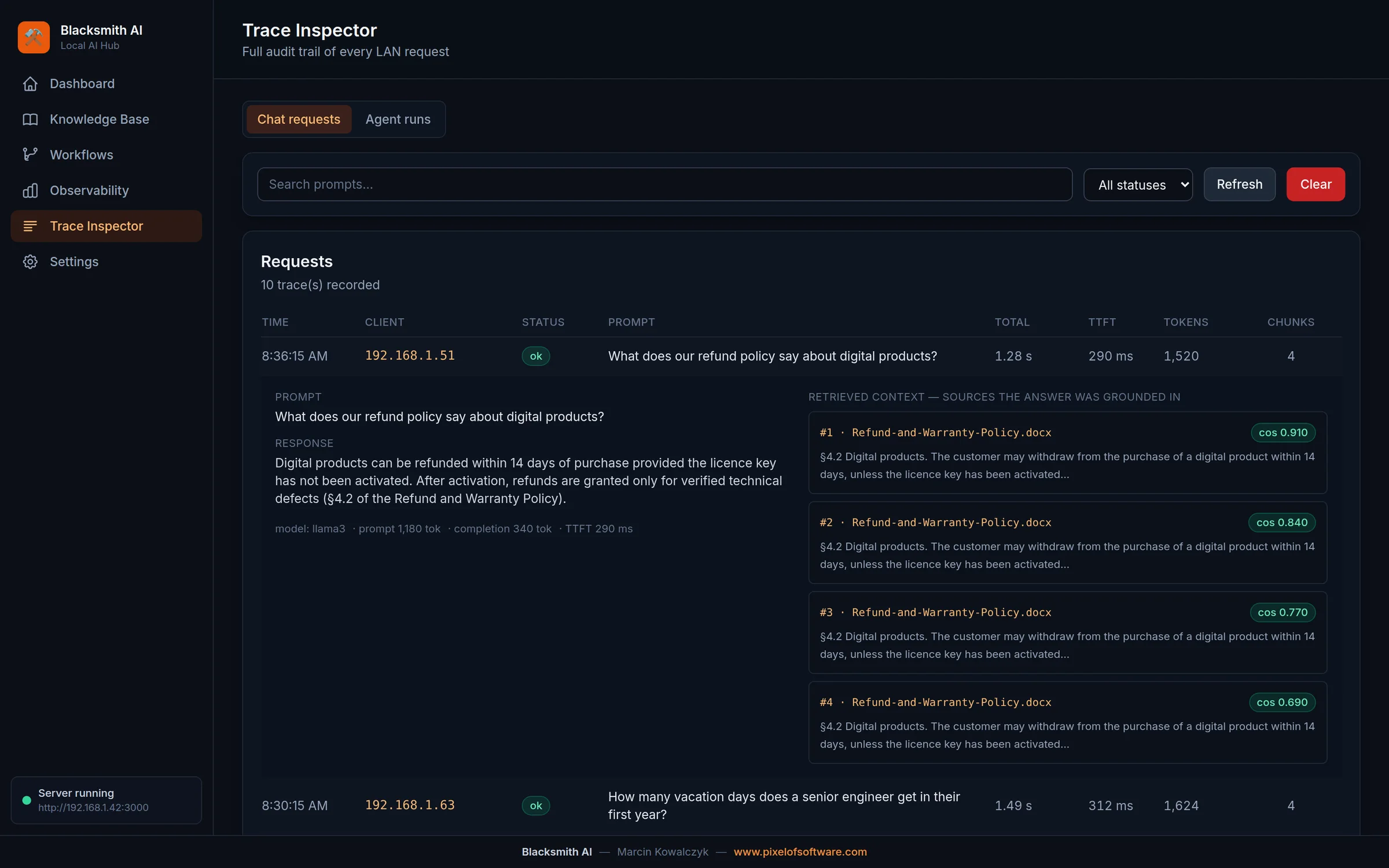
Trace Inspector
Every answer with its full retrieval audit trail: sources, similarity scores and token counts.
Deployment
01
Copy the app onto any Apple Silicon Mac and install Ollama, the free local model runtime. No Docker, no database servers, no IT tickets.
02
Drag your PDF, Word, Excel and JSONL files in. A background worker vectorises them with live progress and ETA — multi-gigabyte files welcome.
03
Start the LAN server and send the URL to the team. Browsers get a chat and published workflows; developers get an OpenAI-compatible endpoint.
Specifications
FAQ
No. Models run locally through Ollama; documents, vectors and telemetry are stored in embedded databases on the host Mac. The app makes no external calls — you can verify it with a firewall rule.
One Apple Silicon Mac (M1 or newer). 16 GB RAM runs 8B-class models comfortably; 32 GB+ gives headroom for larger models and heavy ingestion. A Mac mini is the typical choice.
Per company, with a one-time licence fee and an optional support & updates plan. Tell us about your team in the form and we'll send a concrete quote — usually within two business days.
Yes. We built Blacksmith AI from scratch, so we can extend it: custom integrations, tailored agent workflows, on-site deployment and operator training are available as fixed-scope packages.
Get it
Tell us about your team and use case. You'll get a live demo and a concrete quote — from the engineer who built the product, not a sales queue.
Prefer email?hello@pixelofsoftware.com