Home → Products → Desk & Park

PRODUCT // WORKPLACE & PARKING

Desk & Park

Every desk. Every parking spot. One platform.

Desk & Park is booking software for hybrid offices: your team reserves desks, parking and meeting rooms from an interactive floor map and checks in with a QR code from the phone browser, nothing to install — while no-shows return to the pool automatically. Ten interface languages, wall tablets outside meeting rooms, SSO and SCIM for larger organisations. Start free today.

  • Free plan — no card
  • Desks + parking + rooms
  • QR check-in, nothing to install
  • 10 interface languages
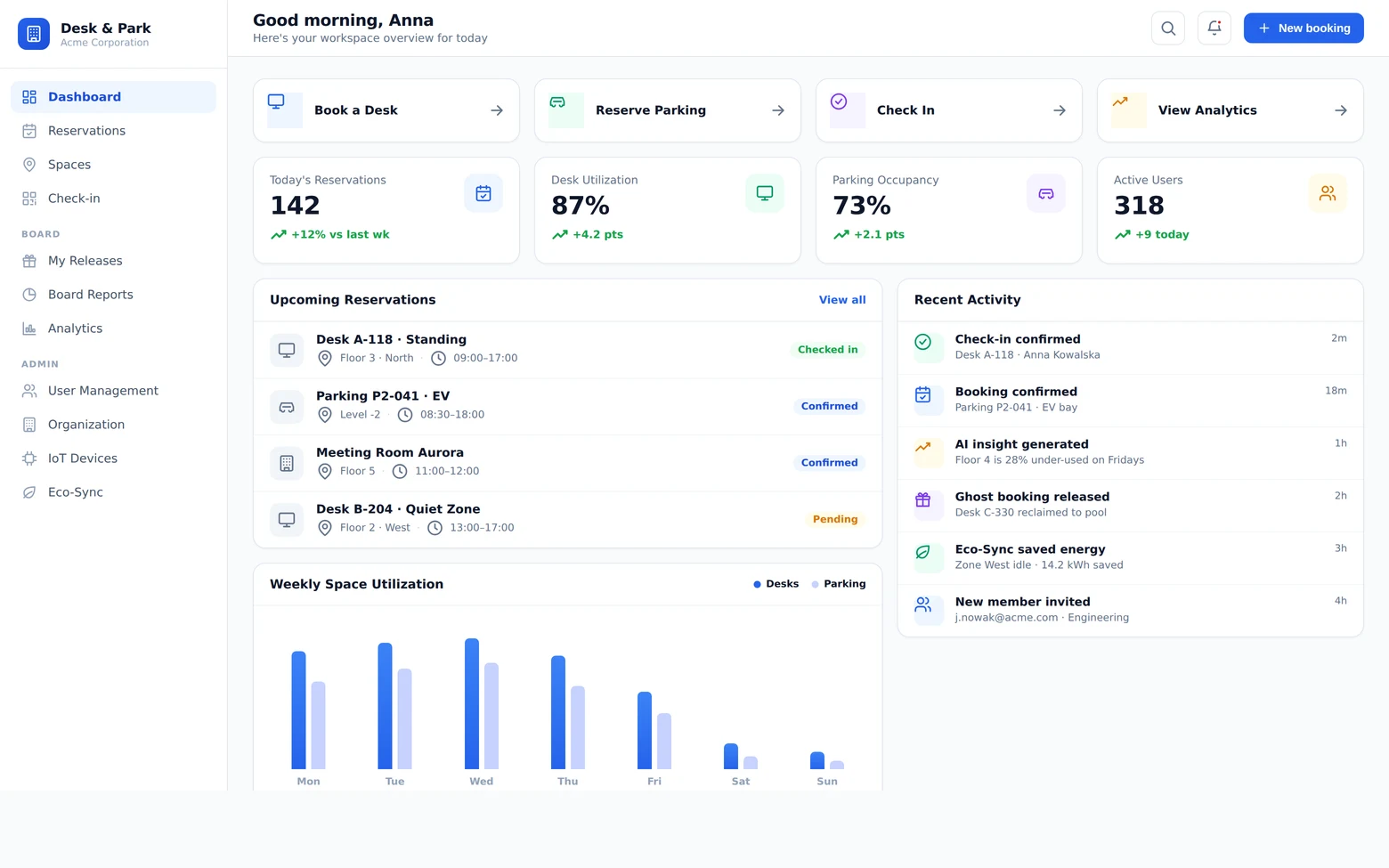
Desk & Park dashboard — quick actions, today’s agenda with a checked-in desk and a meeting room, and the “who is in the office” floor map with people grouped by department

Why Desk & Park

Turn a half-empty office into space you can actually plan around

Hybrid work broke the assigned-desk model. Desk & Park gives every employee a frictionless way to claim the space they need — and gives you the truth about occupancy, so you can size desks, parking and cost to reality.

Desks, parking and rooms in one place

Most tools book a desk or a parking spot — never both. Desk & Park handles desks, parking, EV bays and meeting rooms under one login, one map and one set of rules, so an employee plans the whole day in a single flow.
Reclaim the space no-shows waste

A booking only counts once someone checks in — by QR code, at the space, inside a time window. Miss it and the desk or bay returns to the pool automatically, so nobody hoards a spot “just in case” and real utilization climbs without adding a square metre.

People come in for people, not for desks

The “who is in the office” panel shows, on the map and in a roster grouped by team, who has booked and who has already checked in. Employees pick the day and the desk next to their team instead of landing on an empty floor. Visibility has an org-wide switch and a per-user opt-out — both enforced server-side, so an anonymous pin carries no name in the payload either.

Numbers that will survive a floor-plan meeting

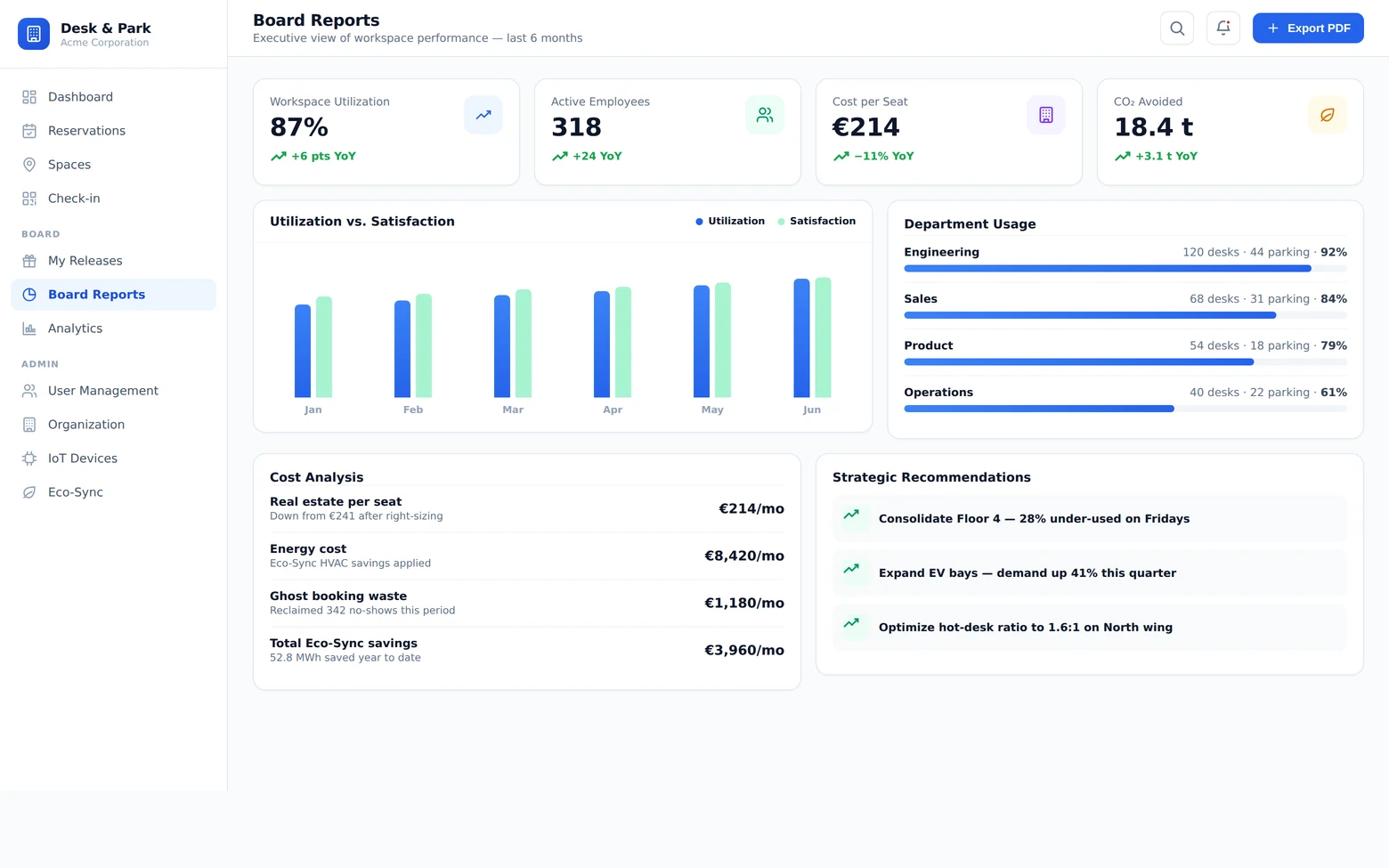
Utilization weighted by capacity, not averaged over averages; a ghost-booking rate that excludes rooms, because a room can never be a no-show; cost per seat, split by department and team. The board report adds three recommendations drawn from 30 days of data. The conversation about giving up a floor stops being an opinion.

Capabilities

Everything a hybrid office needs — booking, check-in, analytics

From an employee tapping a desk on their phone to an admin drawing the floor plan, Desk & Park closes the whole loop on two surfaces: the browser on any computer or phone, and the tablet outside the meeting room.

01

Book from an interactive floor map

Book by looking, not guessing: pick a desk, a parking bay or a meeting room straight from a live floor plan — green is free, grey is taken — in one click. Recurring bookings send one notification for the whole series, and an admin can book on someone else’s behalf.

02

QR check-in with auto-release

Confirm you’re here by scanning the QR code at the desk or bay with the phone camera, straight in the browser, or by typing the code — inside a configurable window (60 minutes either side of the start by default). Scanning a free desk books it and checks you in with one tap; scanning a taken one offers the nearest free desks instead. Meeting rooms are held for their whole window and are never released as no-shows.

03

Assigned spaces, released for a day

A board member or manager can hold a desk or a parking bay permanently — a space that is never booked and never a no-show. On days away they release it with one tap (“I’m away today”) and it joins the pool until someone takes it. Executive assistants and admins can also book a dozen seats at once for the guests of a general meeting: no names, no check-in, counted separately in the reports.

04

Meeting-room wall tablets

A device by the door shows that room’s day, refreshed every 10 seconds, and takes check-ins. Paired with a one-time six-digit code, authenticated by its own token rather than a user session, with its own language per device. A kiosk deliberately cannot book — there is no account behind the glass to attribute a reservation to.

05

Your own floor and parking maps

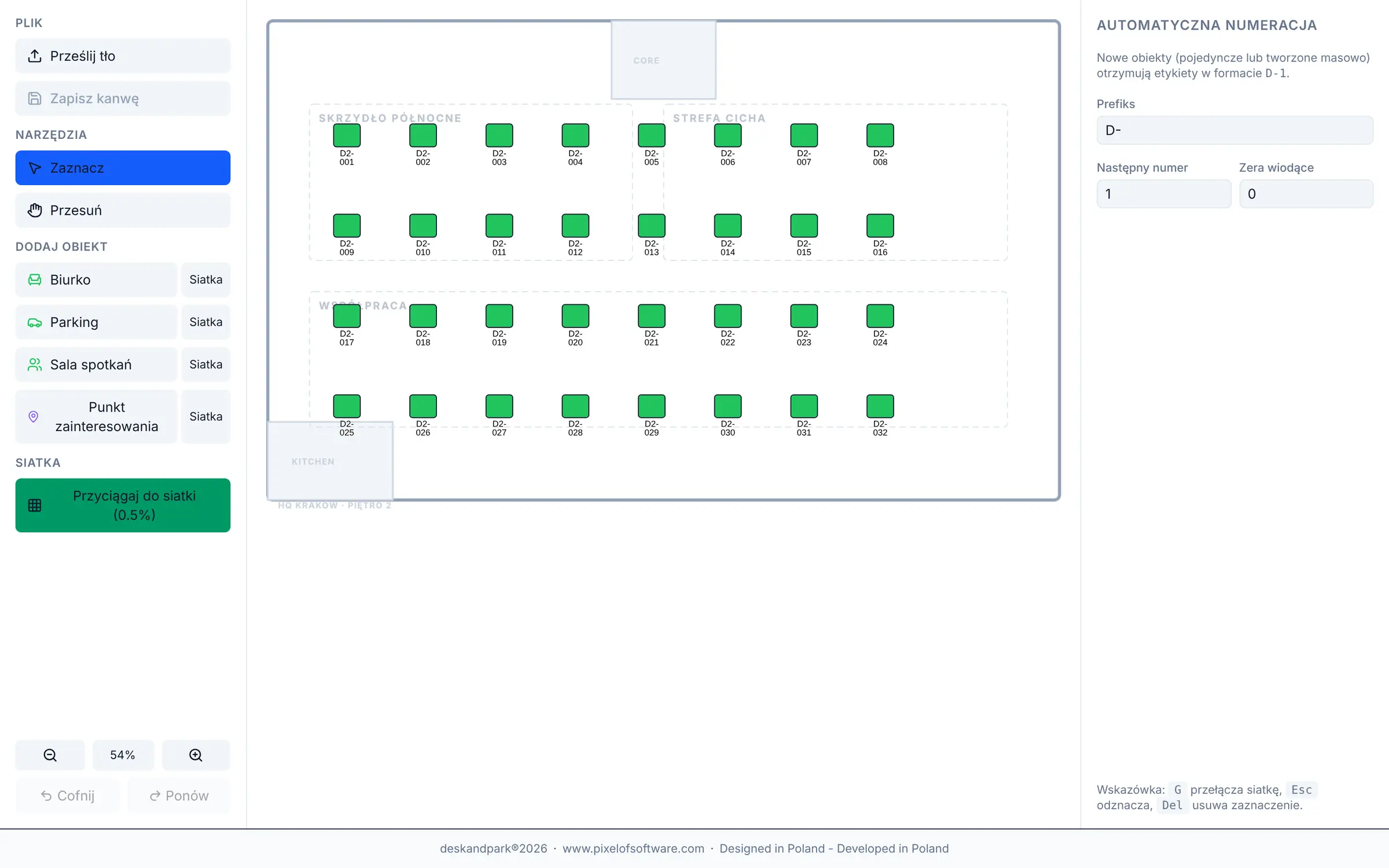
An admin uploads the real plans — PNG, JPG, SVG or CAD (DXF/DWG) — and places spaces by clicking on the map, with versioned revisions. The QR sticker sheet for a whole location prints as one document, and bulk token rotation flags the location as “needs reprint”, so a site never quietly runs on dead codes.

06

Visitors, notifications and calendar

Register expected guests and see the visit list with hosts. Confirmations say where the space is (“HQ Kraków · Floor 3 · D-301”), carry a “Show on map” button and an .ics attachment, and several bookings made in one human action arrive as one email, not three. Slack and Teams receive booking events and a daily digest.

07

Analytics and board reports

Month-over-month utilization trends, day-and-hour heatmaps, EV charging demand, ghost-booking rate per floor, cost per seat and plan usage. The board report adds AI-generated recommendations, and the department-and-team table exports to CSV.

08

Enterprise-grade foundation

Your own PostgreSQL database per organisation — users, bookings, maps and the audit log live there, not in a shared table. Role-based access, 2FA (TOTP) with backup codes, passkeys, a list of your active sessions, SSO over OpenID Connect and directory sync over SCIM. Full audit log and nightly encrypted backups with reversible restore. When our support team opens your organisation, it is written into your audit log, not only ours.

Screenshots

Look inside

Captures of the running application, not mockups — exactly what your team and your admin see. The figures come from a full year of booking history in a demo environment.

Desk & Park — Reservations

Reservations

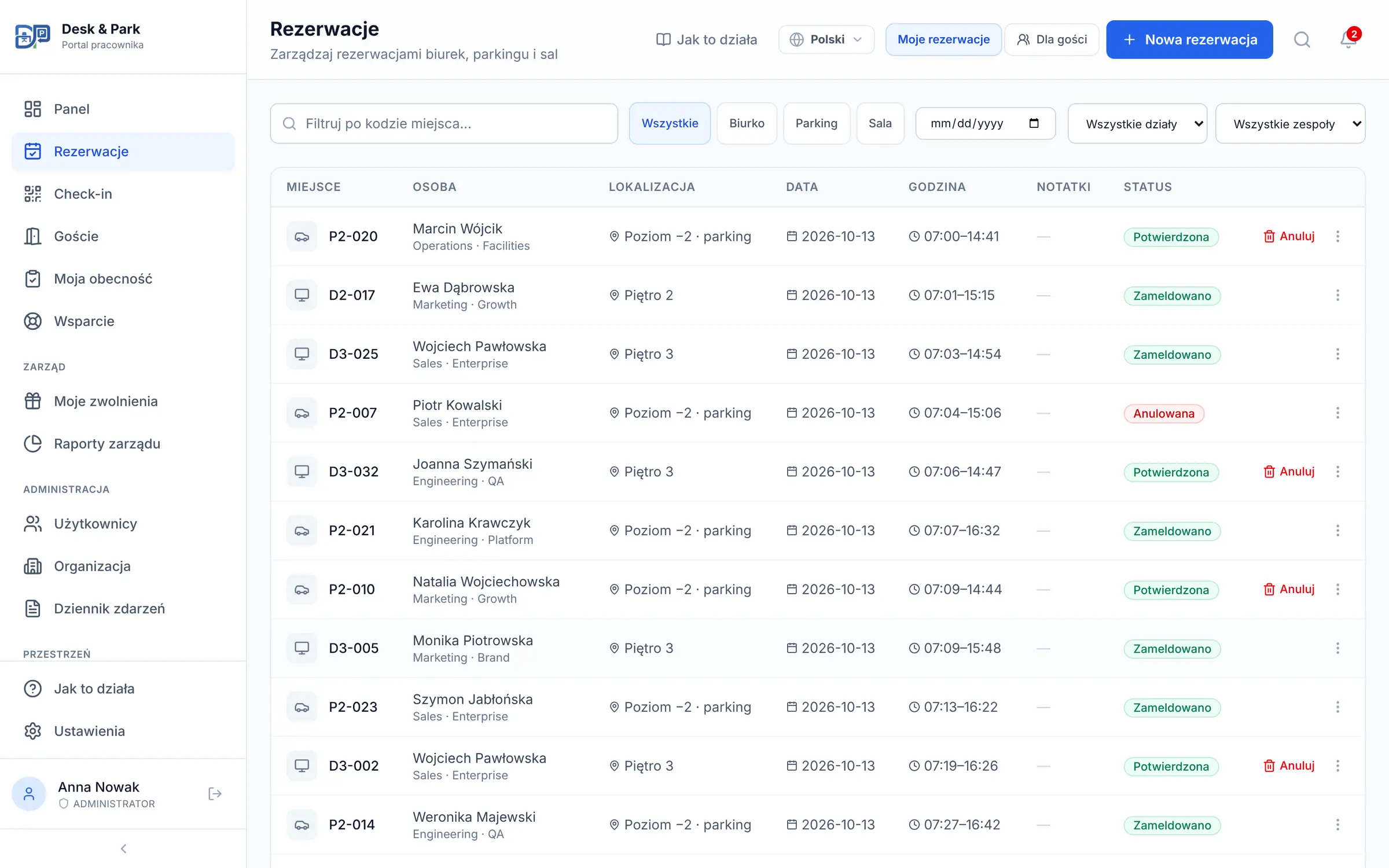
Every desk, parking and room booking in one table — filtered by type, date, department and team, with the person, location and status of each row, and a separate mode for guest bookings.

Desk & Park — Check-in

Check-in

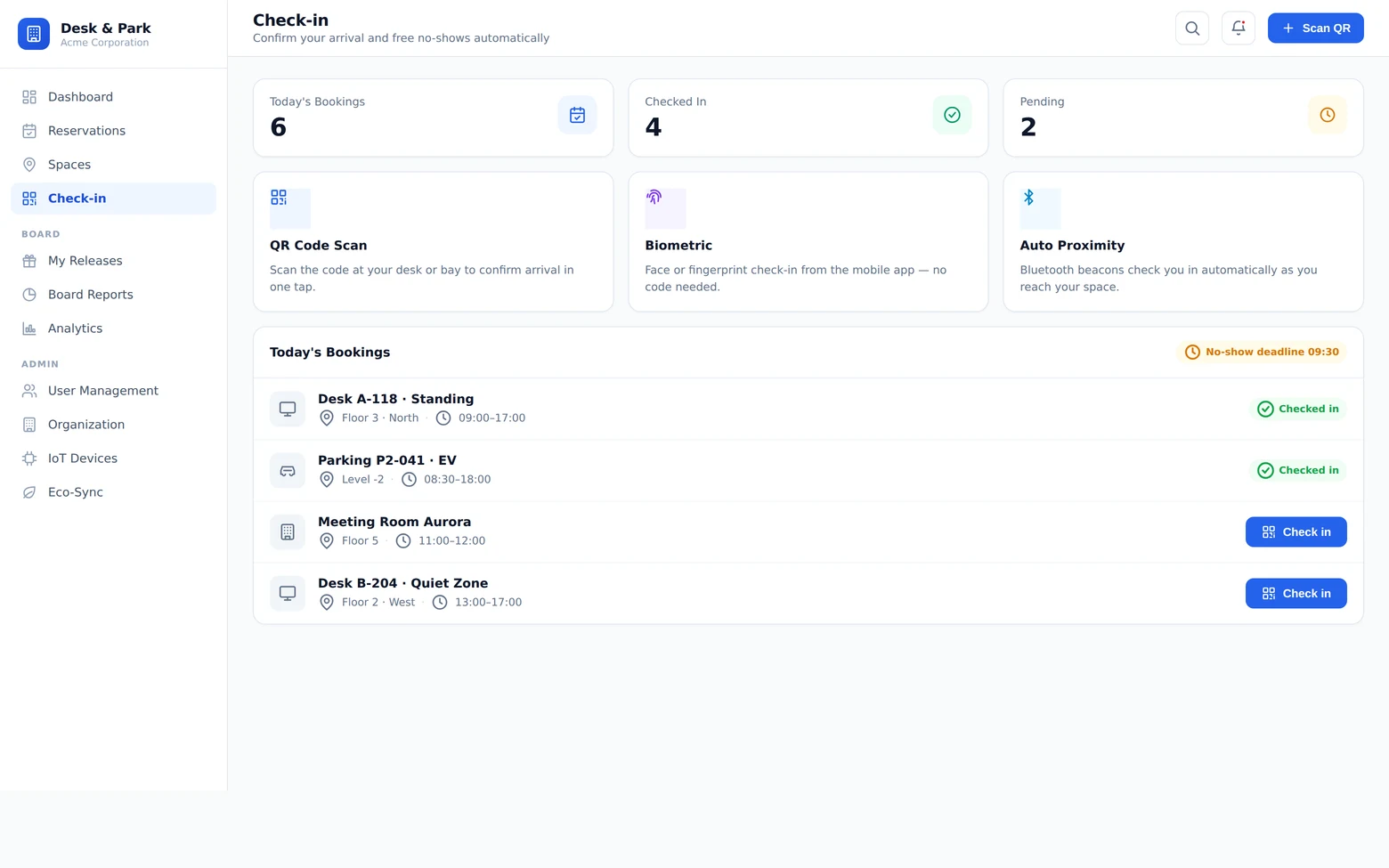
Today’s bookings with the checked-in count and the “Scan desk QR” button that confirms arrival with the phone camera; meeting rooms are listed separately — held for their slot, never released as a no-show.

Desk & Park — Analytics

Analytics

The board report over the last six months: office and parking utilization, no-show rate, peak occupancy, active users, average booking length and EV-charging demand — computed from the full booking history, not a sample.

Desk & Park — Map editor

Map editor

Placing desks, parking bays and rooms by clicking on the uploaded floor plan — with snap-to-grid, automatic numbering and versioned revisions.

Rollout

Live by the afternoon, not by the quarter

01

Set up the office

Add locations and floors, upload the plans (image or CAD) and place desks, bays and rooms by clicking on the map. Print the QR sticker sheet for the whole location as one document. No spreadsheet, no waiting on IT.

02

Invite the team

Email invitations, CSV import, or automatic directory sync over SCIM. Invited people sign in with a one-time e-mail code, then with a password, a passkey or your SSO. The app runs in the browser on a laptop and on a phone — QR check-in included, nothing to install.

03

Book, check in, optimise

People book on the map and check in by QR from day one; you watch utilization, reclaim no-shows and see where to shed square metres — straight from the dashboards and the board report.

Pricing

Plans that grow with your team

Start free and self-serve — no card, no sales call. Move up as you grow; Enterprise is shaped around you.

Try it

Start

$0free forever

  • Up to 10 spaces
  • Up to 10 users
  • 1 location
  • Interactive map and QR check-in
  • No card required
Start free

Small teams

Standard

$128/mo

  • Up to 75 spaces
  • Up to 50 users
  • Up to 3 locations
  • Your own floor and parking maps
  • Meeting-room tablets and QR stickers
Start free

★ Most popular

Pro

$230/mo

  • Up to 125 spaces
  • Up to 100 users
  • Up to 10 locations
  • Analytics and board reports
  • Everything in Standard
Choose Pro

At scale

Enterprise

Custom

  • Unlimited spaces, users and locations
  • SSO and directory sync (SCIM)
  • Self-hosted deployment option
  • Nightly encrypted backups and restore
  • Dedicated onboarding
Talk to us

Priced per organisation, not per seat. Annual billing = two months free ($1,280/year Standard, $2,300/year Pro). Billing in EUR (€114 and €206 per month) and in PLN (499 zł and 899 zł per month) is also available. “Spaces” means desks and parking bays; meeting rooms never count toward the limit. Enterprise is priced per contract and can run in your own infrastructure.

Specs

Technical details

Platform
Web app in the browser on desktop and phone, nothing to install · meeting-room tablet kiosk
Bookings
Desks · Parking · EV bays · Meeting rooms · recurring series · booking on behalf
Maps
Upload PNG · JPG · SVG · CAD (DXF/DWG); click-to-place editor with revisions
Check-in
QR code at the space (phone camera in the browser, or manual code entry) · configurable window · auto-release
Sign-in
Email + password · one-time e-mail code for invited users · 2FA (TOTP) · passkeys (WebAuthn) · SSO (OpenID Connect) · SCIM
Integrations
Slack · Microsoft Teams · room-calendar sync with Microsoft 365 and Google Workspace · .ics calendar export
Languages
10 interface languages: en, pl, de, fr, es, it, ro, bg, zh-Hans, zh-Hant
Security
Own database per organisation · RBAC · audit log · nightly encrypted backups
Plans
Start (free) · Standard · Pro · Enterprise — billed in PLN, EUR or USD
Hosting
SaaS cloud or your own infrastructure (Enterprise)

FAQ

What buyers ask

Is the free plan really free?

Yes. The Start plan is free forever — up to 10 spaces, 10 users and 1 location, with the interactive map and QR check-in. No card, and you can set the account up yourself at deskandpark.com.

Does it handle desks and parking?

Both, plus meeting rooms and EV bays — in one system, with one booking flow, one map and one set of rules. Employees never juggle two apps. Rooms follow a different rule on purpose: they are held for the whole booked window and are never released as no-shows, because a check-in there protects nothing.

Do we have to install an app?

No. Desk & Park runs in the browser on a laptop and on a phone — booking, the floor map and QR check-in with the phone camera included. There is nothing to roll out through an app store and nothing for IT to approve: invited people open the link from their e-mail, sign in with a one-time code and are in.

How do we get the office and the team in?

An admin uploads the real floor and parking plans (image or CAD), places spaces by clicking on the map, then prints the QR sticker sheet for the whole location. People come in via email invitation, CSV import, or automatic directory sync over SCIM — with SCIM, someone leaving the company loses access without a manual step.

Is our data safe?

Every organisation gets its own database — not a shared table with a tenant column. Access is role-based with 2FA, passkeys and SSO; every change lands in the audit log, and nightly encrypted backups make a restore reversible. When our support team opens your organisation, that access is written into your own audit log, not just ours.

How does billing work?

Self-serve, monthly or annually, in PLN, EUR or USD (a year costs ten months) through a secure payment page; change plan whenever you like. You pay per organisation, not per seat, so the bill does not grow with every new hire. Enterprise is priced per contract — tell us your scale in the form and we will send a specific quote.

Talk to us

Enterprise, a guided demo, or a question?

Start free and self-serve at deskandpark.com — or tell us about your offices, parking and team size, and we will prepare a demo and a specific Enterprise quote, from the team that built the platform.

GDPR compliant. Your message goes straight to our sales inbox — no CRM, no marketing automation, no data resale.

Prefer email?hello@pixelofsoftware.com

See the live app at deskandpark.com