Home → Products → cwicz.online

PRODUCT // COACHING SAAS

cwicz.online

Your Excel plan. On your athlete’s phone.

cwicz.online turns the spreadsheet a coach already keeps into a mobile training list. Upload the plan once; an AI agent fills in the missing instructional videos and writes technique tips in Polish; the athlete gets one scrolling list with a weight field next to every set — in the phone browser or on an Apple Watch, Wear OS or Garmin watch — and the coach watches the session as it happens. Free for up to three athletes.

  • Free up to 3 athletes
  • Excel import, once
  • AI videos + technique tips
  • Phone + watch apps
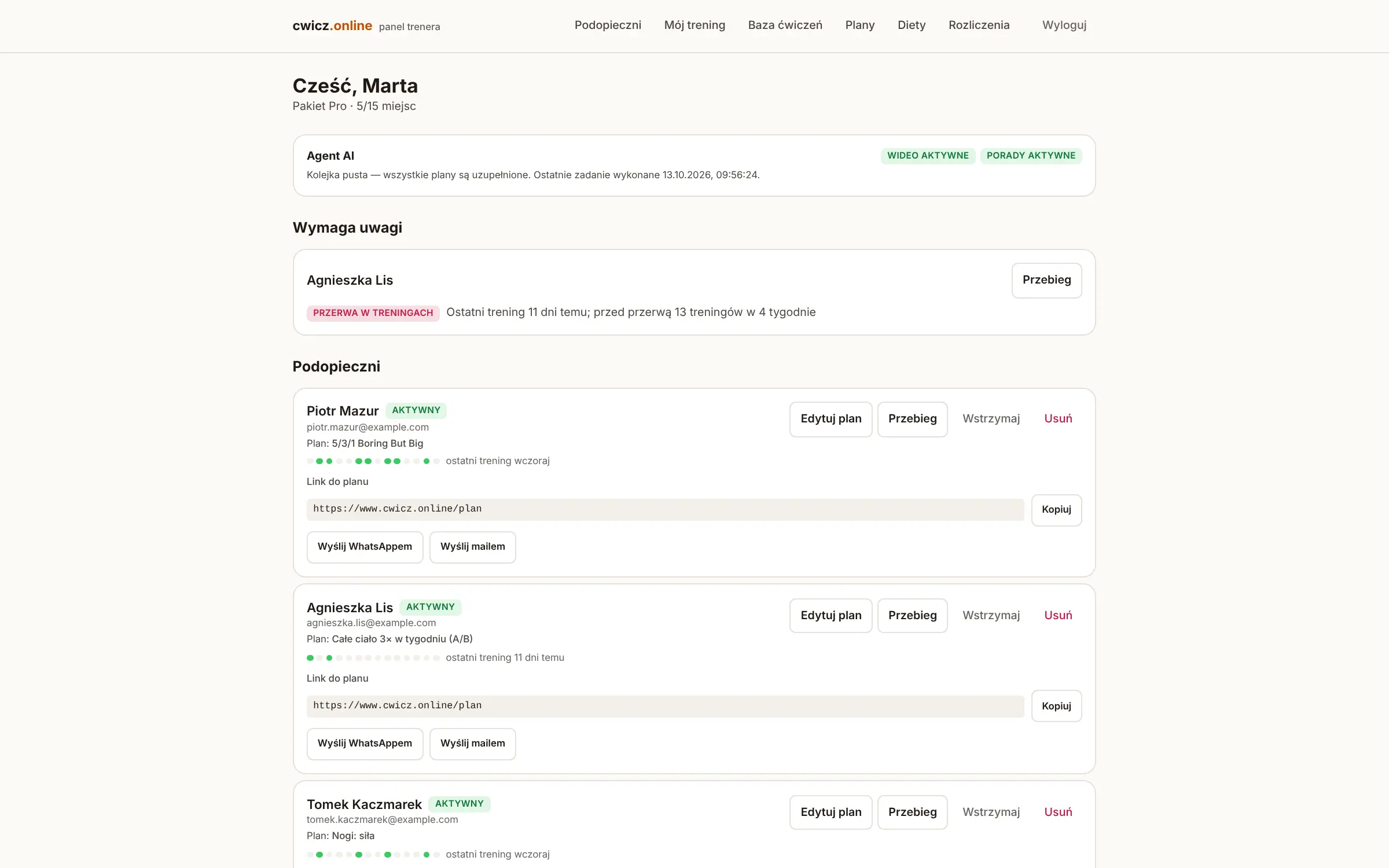
cwicz.online coach panel — the AI agent status, the “needs attention” section and the athlete list with each one’s plan and training streak

Why cwicz.online

The plan stops living in a file that nobody opens in the gym

Coaches already have the plan — in Excel. Athletes already have the phone. cwicz.online connects the two without asking the coach to re-type anything, and gives the coach the one thing a spreadsheet never returns: what was actually lifted.

Nothing to re-type

The parser reads the columns coaches actually use — weeks, days A/B/C, sets, tempo, rests, superset prefixes like 1A/1B, a variable number of “Weight S1…Sn” columns, hyperlinks hidden under cell text, Polish decimal commas. It finds the header by content, not by position, so a sheet with an extra title row or rearranged columns still imports.

Videos and tips, filled in by an agent

Every exercise without a link gets a short instructional video from YouTube; every exercise gets two or three concrete technique cues and a list of common mistakes, generated by Gemini in Polish. Results are cached per exercise, so “Front Squat” in forty athletes’ plans is one call, not forty.

The weight typed is the weight saved

No save button. The value goes to the database 700 ms after the last keystroke, with a status marker next to the field; a failed save in a basement gym is marked and retried when the signal returns. The placeholder shows the planned weight or last session’s, so the athlete remembers nothing.

A plan that lives in the app

The import is one-time. From then on the coach edits any exercise in the panel and the athlete sees the change immediately — no new file, no new upload. Progress, records and body-mass trends accumulate from the first logged set.

Capabilities

Everything between the coach’s spreadsheet and the athlete’s next set

From the upload form in the coach panel to a wrist vibration ten seconds before the rest ends, cwicz.online covers the whole loop: plan, enrichment, logging, review.

01

Excel import or a ready template

Upload the coach’s own sheet, or download the empty template the app generates (plan sheet, athlete summary, instructions). No sheet at all? Pick one of 54 ready plans in 18 categories — powerlifting, upper and lower body, core, isometrics, jump and speed, full body for beginners, conditioning, running, yoga, breathing, calm-down and six post-injury programmes — and assign it in two clicks.

02

An AI agent on a durable queue

Enrichment runs through a persistent Postgres job queue, not an in-memory loop: idempotent handlers, de-duplication per exercise, atomic claiming, retries with back-off, dead-letter status after the last attempt. A missing API key disables that one capability and reports it; it never blocks the queue. The coach panel shows what the agent is doing and when it last succeeded.

03

A curated exercise library

349 exercises with technique notes and common mistakes — gym, running and cycling — filterable by muscle, muscle group or training group. If an exercise of the same name appears in a sheet, its notes attach automatically; the same cues the athlete reads on the phone.

04

The athlete’s screen, built for one hand

Touch targets of at least 48 px, a numeric keyboard, one long list for the day with week and day switchers. Videos load only on tap, so a day with eight exercises does not pull eight iframes. Technique and AI tips are collapsed to keep the list short. Rest timer, session finish, and a strip showing which days of the week were trained. Installs as a PWA.

05

Watch apps: Apple Watch, Wear OS, Garmin

The watch pairs with a six-digit code typed on the account page — nothing to type on the wrist. The server computes everything that needs the plan (set mode, weight step, suggested weight, rest, superset order); the watch shows it and sends results back. Weight and reps are pre-filled, so a normal set is one “Done”. Rest starts by itself with a vibration ten seconds before the end; timed sets count down; the whole session survives no signal and an app restart. Workouts land in Apple Health or Garmin Connect. The apps are built in CI and available on request — not in the app stores yet.

06

Coach panel: who needs attention

The panel opens with the athletes who need a look — missed sessions, a streak, a set logged far above plan — then the full list with each athlete’s active plan and status. Invite by link or code, remove, archive plans, assign a diet, and keep a plan of your own under “My training”.

07

Progress and records

A regularity strip, a 30-day summary, per-exercise charts for the top three lifts, a records table with upcoming records, and body-mass trend from the measurements the athlete enters. Every section works from day one and says plainly how much data is still missing instead of drawing a chart from one point.

08

Diets included, free for the athlete

Six diet plans — balanced cut, low-carb cut, high-protein bulk, clean bulk, maximum cut with a fasting day, gluten-free balanced — each with daily calorie and macro targets and meals with recipes for every weekday. The coach can assign one; the athlete can pick one; either way it costs the athlete nothing.
Screenshots

Look inside

Captures of the running application, not mockups — the coach panel on a laptop and the athlete’s screens on a phone. Names and training history come from a demo environment seeded for the captures.

cwicz.online — Athlete in the coach panel

Athlete in the coach panel

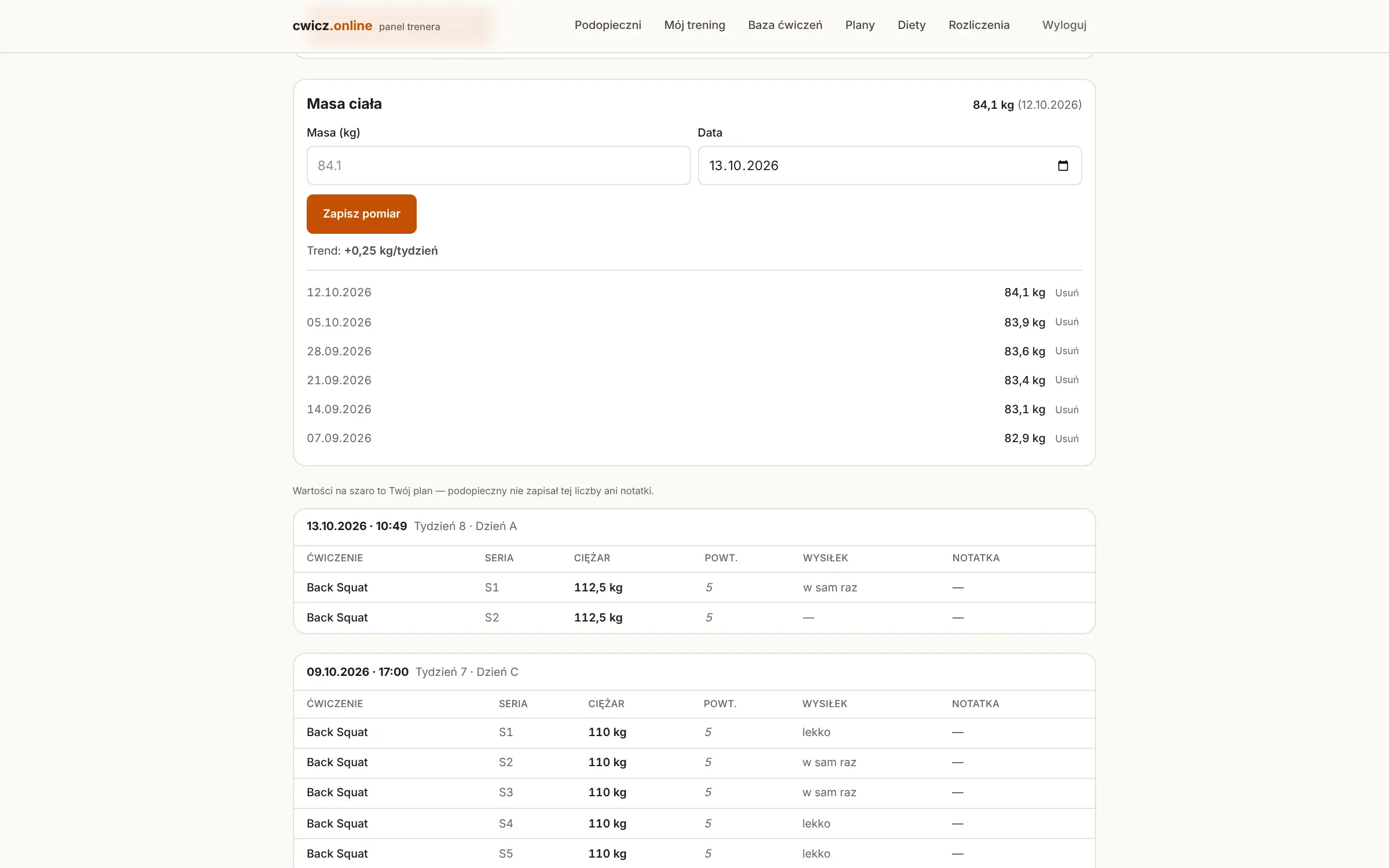
One athlete as the coach sees them: the body-mass trend from the measurements they enter, then each session set by set — weight, reps and effort — with planned values shown in grey wherever nothing was logged.

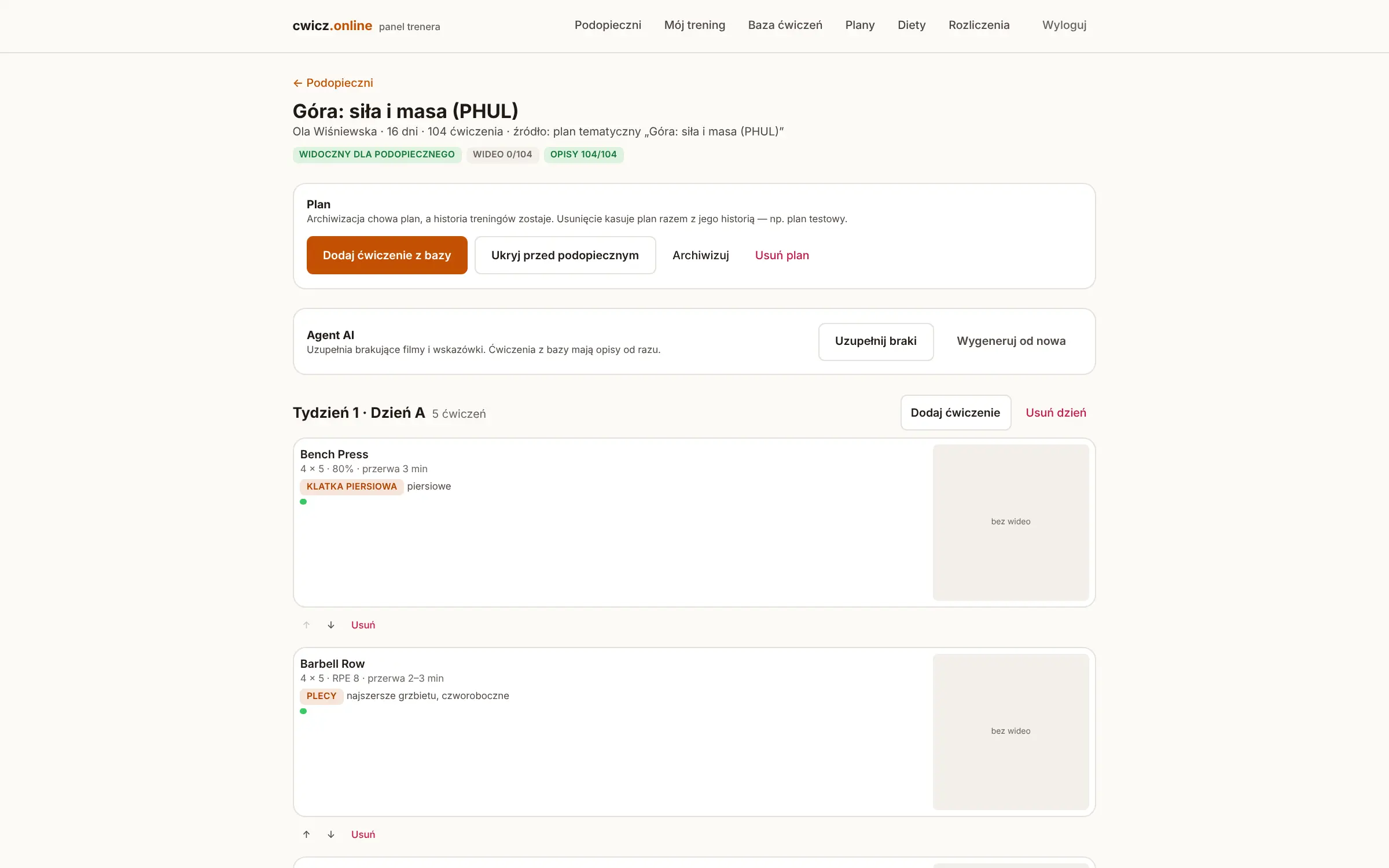
cwicz.online — Plan editor

Plan editor

A plan week by week and day by day — here a ready “Upper: strength and size (PHUL)” template assigned to an athlete: every exercise editable in place, the agent’s coverage of videos and technique notes at the top, and the athlete sees each change immediately.

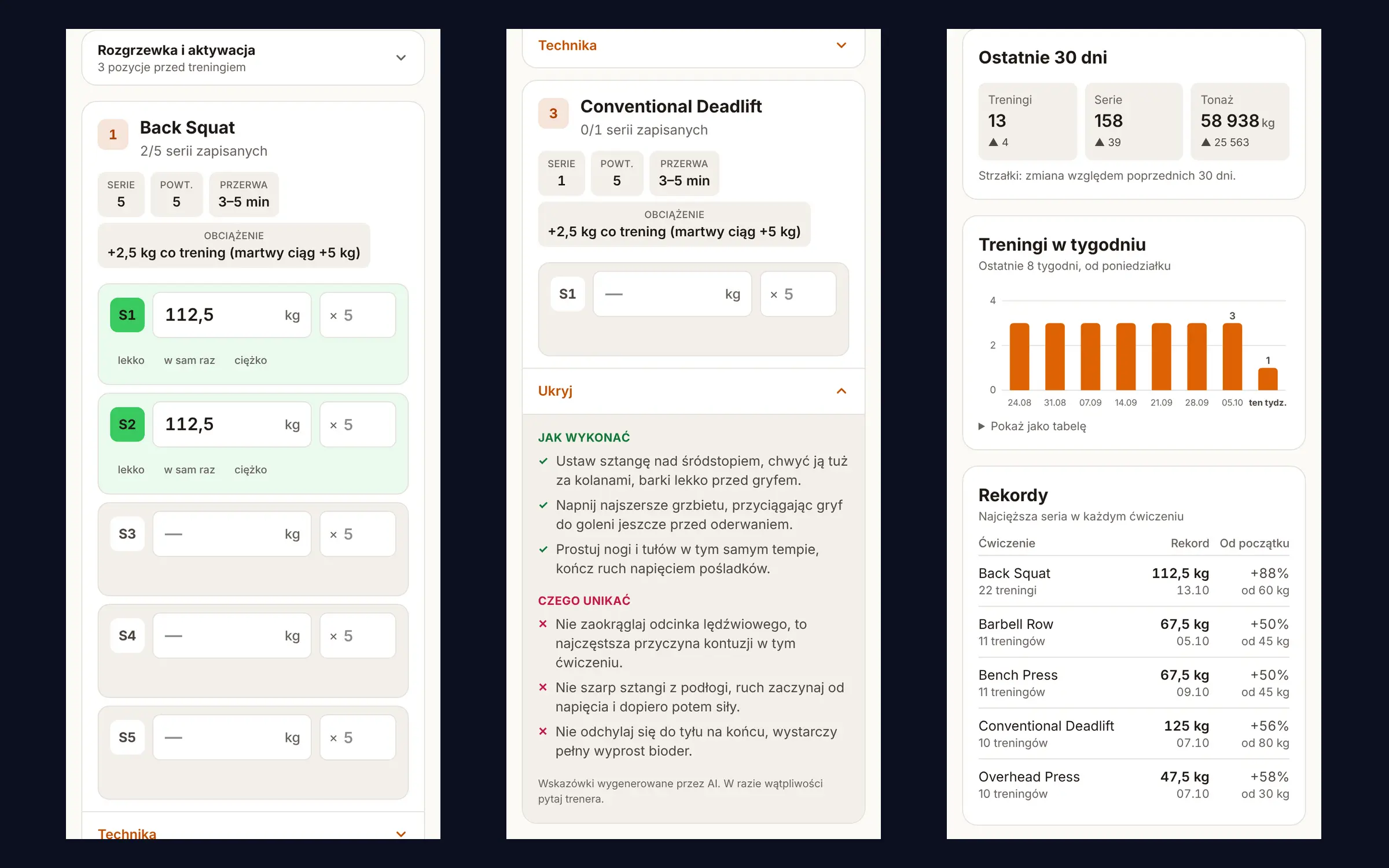
cwicz.online — Athlete’s phone

Athlete’s phone

Today’s list with a weight field per set and autosave, an exercise card opened for the technique cues, and the progress screen — three real phone captures side by side.

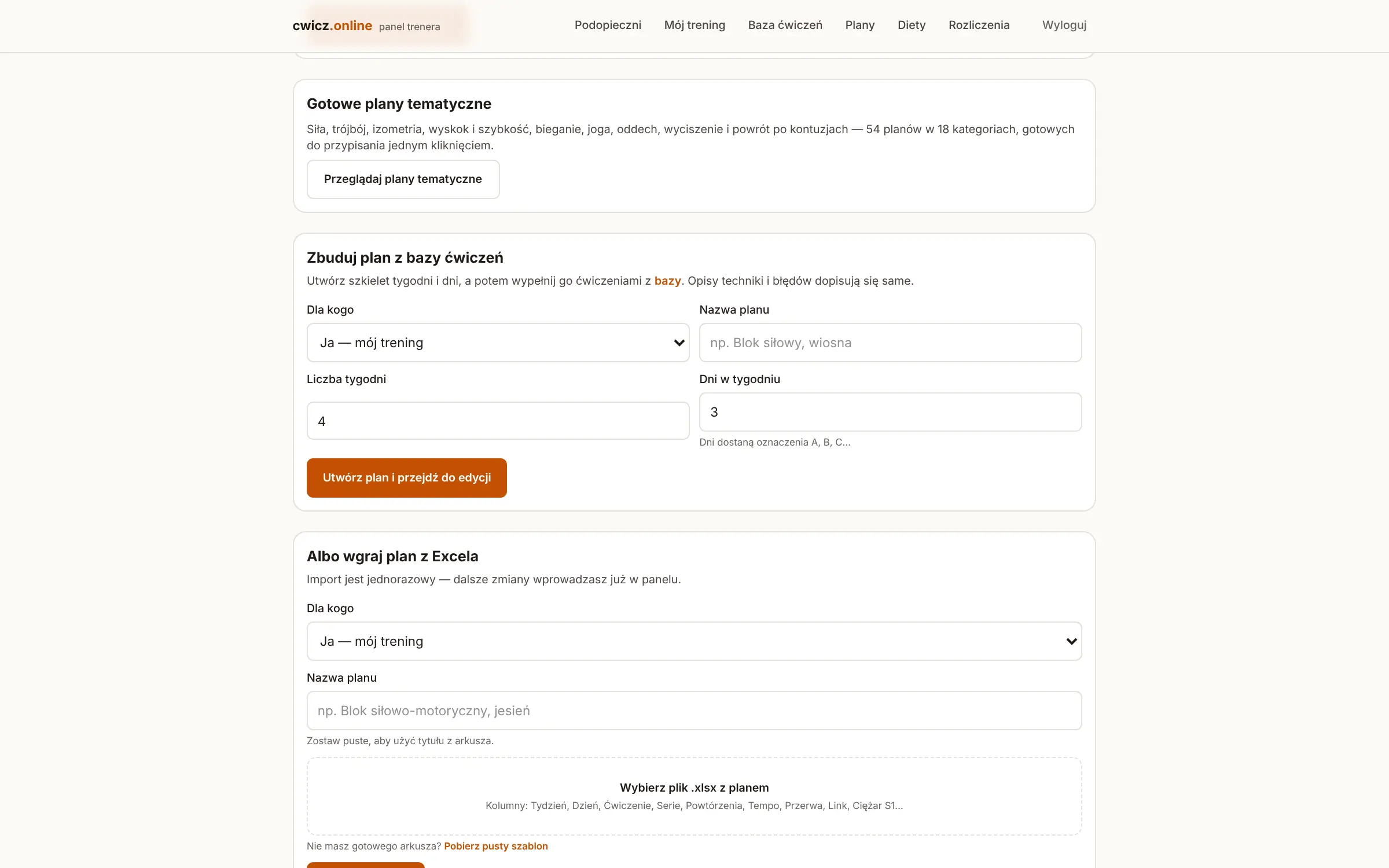
cwicz.online — Three ways to start a plan

Three ways to start a plan

One of 54 ready templates in 18 categories, a skeleton of weeks and days filled from the exercise library, or the Excel sheet the coach already keeps — with an empty template to download for those who have none.

Rollout

Live before the next session, not the next block

01

Upload the sheet

Register as a coach, upload the Excel plan you already keep (or pick a ready template). The parser recognises weeks, days, sets, tempo and rests; the agent starts filling videos and technique tips in the background right away.

02

Invite the athlete

Send the invitation link or code. The athlete registers, opens the plan in the phone browser — or adds it to the home screen — and, optionally, pairs a watch with a six-digit code on the account page.

03

Train, log, correct

The athlete logs weights between sets; you see the session as it happens and adjust the next week in the panel. No new file, no new upload, and the history keeps growing.

Pricing

You pay for how many people you coach

Up to three athletes for free — no card, no deadline. Only the coach pays; the athlete gets access from the connection to the coach and pays nothing.

Try it on your own sheet

Free

0 złfree, no deadline

  • Up to 3 athletes
  • Excel import
  • AI agent: videos + technique tips
  • Live view of training sessions
  • No card required
Start free

A small group

Starter

79 zł/mo

  • Up to 5 active athletes
  • Excel import
  • AI agent: videos + technique tips
  • Live view of training sessions
Choose Starter

★ Most popular

Pro

149 zł/mo

  • Up to 15 active athletes
  • Everything in Starter
  • Weight progress history
Choose Pro

A club or a coaching team

Pro+

299 zł/mo

  • Up to 35 active athletes
  • Everything in Pro
  • E-mail support within 24 h
Choose Pro+

Prices in PLN, gross, VAT 23% included. Monthly, cancelled with one click in the customer portal — no fixed-term contract. The limit only blocks adding new athletes; it never disconnects anyone. Above 35 athletes we size a package individually.

Specs

Technical details

Platform
Web app (PWA) in the phone or desktop browser · watch apps for Apple Watch (watchOS), Wear OS and Garmin (Connect IQ)
Language
Interface and AI-generated tips in Polish
Import
Excel (.xlsx) with header detection by content · supersets · variable set columns · an empty template to download · 54 ready plan templates
AI agent
YouTube Data API for videos · Gemini for technique tips · durable Postgres job queue with retries and dead-letter
Library
349 curated exercises with technique and common mistakes · 6 diet plans with recipes
Logging
Weight, reps, time and check sets · autosave 700 ms after the last keystroke · offline queue with retry · rest timer
Watches
Six-digit pairing code · token valid 180 days · offline queue · HealthKit / Garmin Connect (FIT) workout export
Billing
Stripe Checkout and customer portal · monthly, gross PLN · Free · Starter · Pro · Pro+
Stack
Next.js 15 · React 19 · PostgreSQL (Neon) · Drizzle · Vercel
Security
Cookie sessions with hashed passwords · rate limits on sign-in and pairing · watch tokens revoked on password change

FAQ

What coaches ask

Is the free tier really free?

Yes. A coach with up to three athletes uses everything — import, the AI agent, live sessions, progress — for free, with no card and no deadline. The threshold is small on purpose: every imported plan triggers paid AI calls, and a coach working professionally with 15–25 people is above it from day one.

Does my athlete have to pay or install anything?

No. The athlete pays nothing — access comes from the connection to the coach. The plan opens in the phone browser; adding it to the home screen makes it a full-screen app. A watch is optional.

Will it read my spreadsheet?

Very likely. The parser recognises columns by header text, not position, handles a title row above the header, weeks filled only in the first row of a block, 1A/1B superset prefixes, any number of “Weight S1…Sn” columns, hyperlinks under cell text and Polish decimals. If a sheet still fails, download the empty template the app generates and paste the plan in.

What does the AI agent actually do?

Two things, per exercise: find a short instructional video on YouTube when the plan has no link, and generate two or three technique cues plus common mistakes in Polish. The model gets a response schema and the output is validated before it is stored; the coach can edit or replace any of it. Without API keys the agent skips that step and says so — the plan still works.

Which watches work?

Apple Watch, Wear OS and Garmin, with one shared server contract. Pairing is a six-digit code typed on the account page; the token lasts 180 days or until “Disconnect” or a password change. The apps are built and tested in CI and available on request — they are not in the app stores yet.

Is it available in English?

Not today. The interface, the ready plans, the exercise library and the AI tips are in Polish, which is where the coaches it was built with work. If you need another language for a club or a federation, tell us in the form — that is a scope we can quote.

Talk to us

A club, a coaching team, or another language?

Start free and self-serve at cwicz.online — or tell us about your coaches, athletes and what you need beyond the standard packages, and we will come back with a specific proposal from the team that built it.

GDPR compliant. Your message goes straight to our sales inbox — no CRM, no marketing automation, no data resale.

Prefer email?hello@pixelofsoftware.com

See the live app at cwicz.online